Button Layout
Diagram
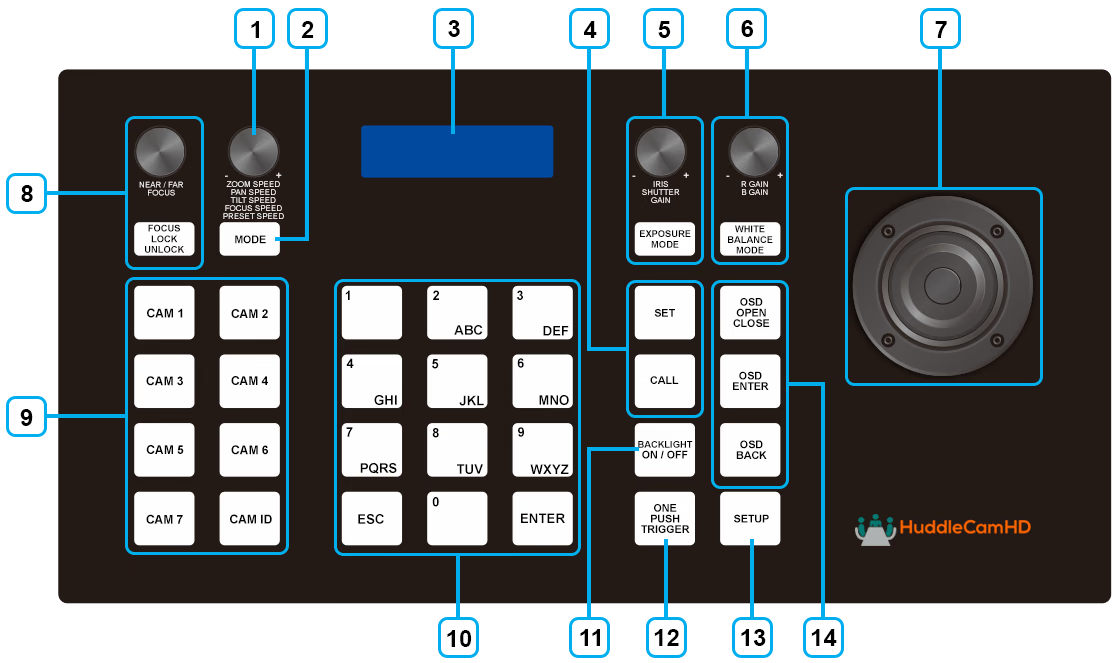
Button Descriptions
| Button | Description |
|---|---|
| 1. Speed Control Dial: | Adjust the speed of the camera’s pan, tilt, zoom, focus and preset recall movements. |
| 2. Mode Change Button | Toggle between Basic and Matrix modes. In Basic mode, the camera select button will switch between the cameras. In Matrix mode, the camera select button will switch between the presets for each camera. |
| 3. LCD Display | Displays the current camera or preset selection, as well as other relevant information. |
| 4. Set & Call Presets | Use the numeric buttons to set and call presets. Presets recall camera position, pan/tilt speed, zoom speed, focus speed, and white balance settings. |
| 5. Exposure Control | Adjust the camera’s exposure settings, including iris, gain, and shutter speed. |
| 6. White Balance Control | Adjust the camera’s white balance settings, including color temperature and tint. |
| 7. Joystick Controller | Control the camera’s pan, tilt, and zoom movements with the joystick. The joystick can also be used to navigate the OSD menu when the joystick setup button is pressed. |
| 8. Focus Control Dial and Focus Lock / Unlock Button | Adjust the camera’s focus and lock it in place when desired. |
| 9. Camera Select | Lets you select from cameras 1-10 in basic mode and presets 1-10 for each camera in matrix mode. The current camera or preset selection is displayed on the LCD screen. |
| 10. Numeric Buttons | Used to set and call presets up to 255 total per camera. This keypad also has an ESC function that can be used to exit out of menus and an ENTER function that can be used to select options within the OSD menu as well as confirm / execute preset recalls and settings changes. |
| 11. Backlight Toggle | Toggles the button's backlights on and off. |
| 12. OnePush Trigger | One push white balance the currently selected camera when pressed. |
| 13. Joystick Setup Menu | Opens the joystick's on screen display menu to allow for adjustments to the joystick's behavior and functions. |
| 14. Camera OSD | Opens the currently selected camera's on screen display menu to allow for adjustments to the camera's settings and functions. |
Connections
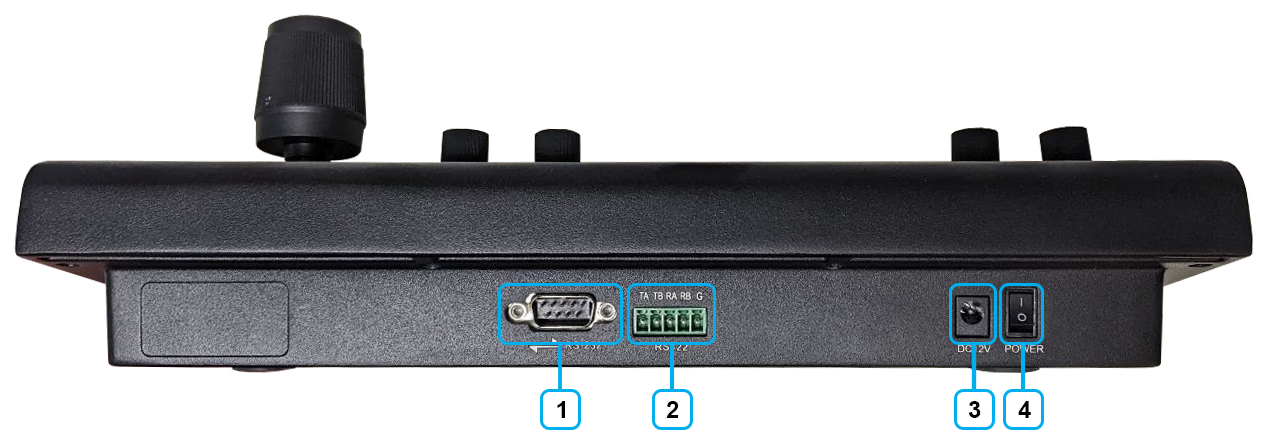
1. RS-232 Port (DB9 connection)
2. RS-422 / RS-485 Port
3. 12V DC Power Port
4. Power Switch
5. Grounding Knob