Audio & Video Settings
Audio & Video Settings
The Audio & Video Settings page accesses the Video Encoding Settings, IP Video Stream 1 / Stream 2 Encoding Settings & Audio Encoding Settings sections of the network video feeds
Video Encoding Settings
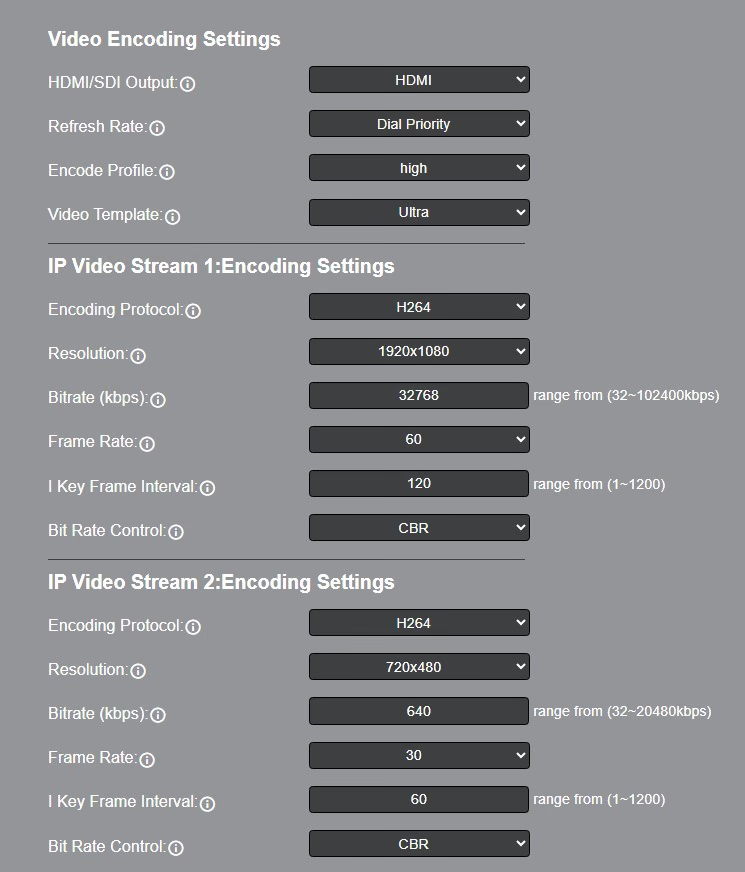
Video Outputs
Select the combination of simultaneous video outputs. This setting only affects the camera when utilizing USB video. (Move SE only)
- Options Include:
- USB/IP/HDMI-SDI_30FPS
- USB/IP
- USB/HDMI-SDI
- HDMI-SDI/IP
- Move 4K & Link 4k Options Include: Simultaneous either SDI or HDMI, IP, and either NDI or USB
Refresh Rate
Frequency adjustment for displays. Select the refresh rate for your region.
- Option Include:
- OSD Priority
- 50Hz
- 60Hz
- Dial Priority (Pan Tilt Zoom Cameras Only)
Encode Protocol
The Encoding Profile defines the compression method and color reproduction of the IP Stream.
- Option Include: High, Main
Video Template
Select Off, Ultra (4K cameras only), High, Medium, Low
Advanced
Off or Super Zoom. Super Zoom sets the maximum resolution to 1080 to double the camera’s zoom distance. For example, a 20X 4K camera will operate as a 40X 1080 camera. (4K Cameras only)
IP Video Stream 1 & 2: Encoding Settings
IP Stream Encoding Protocol
Define the compression method for the stream.
- Option Include:
- H264
- H265
- MJPEG (Move 4K & Link 4K only)
IP Stream Resolution
Define the resolution of the stream.
Stream 1 Options include:
3840x2160 (4K cameras only)
2560x1440 (Studio 4K only)
1920×1080
1280×720
1024x576
960×540 (Move SE only)
720x480
720x408
640x480
640×360
Stream 2 Option Include:
      1280x720 (**Move SE only**)
      720x480
      720x408
      640x480
      640×360
      480x320
      320x240
IP Stream Bitrate (kbps)
Define the bit rate of the stream in kilobits. The higher the value, the higher the video quality at the cost of higher bandwidth. Note: The available range for the bitrate will depend on the selected Encoding Protocol.
- Stream 1 Range: 32 ~ 102400 kbps (Move 4K, Move SE & Link 4K only)
- Stream 1 Range: 32 ~ 81920 kbps (Studio 4K only)
- Stream 2 Range: 32 ~ 20480 kbps
QFactor
Define the Quality Factor of the stream. The higher the value, the higher the video quality at the cost of higher bandwidth (Only available when MJPEG is selected as the Encoding Protocol).
- Range: 1 ~ 99
IP Stream Frame Rate
Define the Frame Rate of the stream.
- Range: 1 ~ 60
I Key Frame Interval
Define the I-Key Frame Interval (GOP) of the stream.
- Options Include: 1 ~ 1200
Bit Rate Control
Select whether the Bit Rate fluctuates (VBR) or is static (CBR).
- Options Include: CBR, VBR
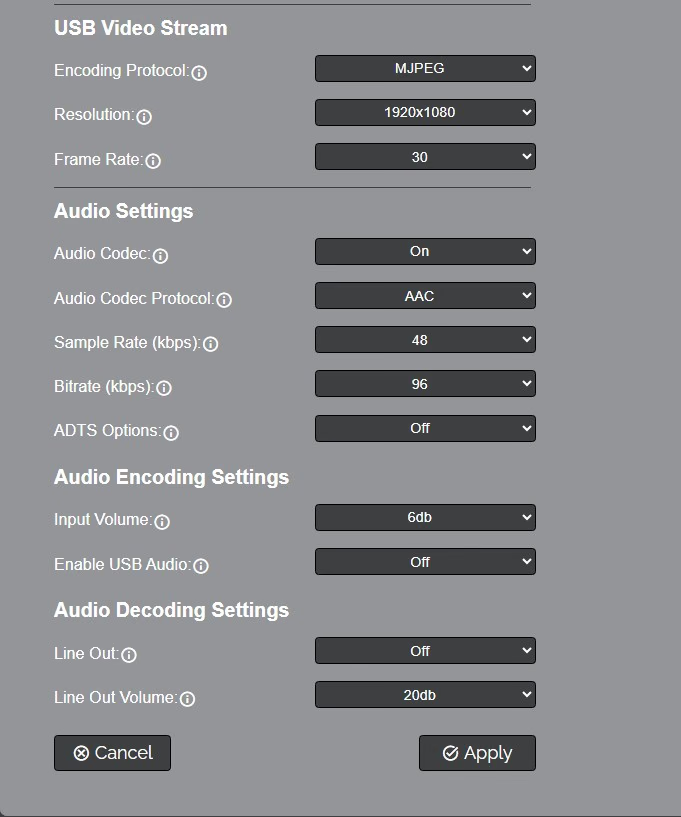
USB Video Stream (Move 4K & Link 4K only)
USB Encoding Protocol
Define the USB output encoding.
- Options include:
- H264
- H265
- MJPEG
USB Resolution
Define the USB output resolution.
- Options include:
- 3840x2160
- 1920x1080
- 1280x720
- 1024x576
- 720x480
- 640x480
- 640x360
USB Frame Rate
Define the USB output frame rate.
- Options include:
- 5
- 7.5
- 10
- 15
- 20
- 24
- 25
- 30
Audio Settings
Audio Codec
Define the audio encoding protocol for the stream.
- Link 4K Options Include:
- Encode to Dante AV-H
- Decode from Dante AV-H
- Other (The Link 4K must be set to "Other" in order for RTMP streaming to work)
- Off
- Move 4K & Move SE Options Include:
- On
- Off
Audio Codec Protocol
AAC, G.711A, or G.711U (G.711A & G.711U are Move 4K & Link 4K only)
Sample Rate (kbps)
Define the number of samples per second the audio utilizes.
- Options Include:
- 44.1 (Move 4K, Move SE, Link 4K only)
- 48
- 32 (Move SE only)
Audio Bitrate (kbps)
Define the number of bits per second the audio utilizes in kilobits.
- Options Include: 96, 128
ADTS Options
Select whether Audio Data includes timestamps.
- Options Include: On, Off
Audio Encoding Settings
Input Volume (Move 4K, Link 4K & Move SE)
Define the Input Volume of the Audio Input.
- Range: 0db ~ 59db (Move 4K & Link 4K only)
- Range: 0db ~ 30db (Move SE only)
Enable Audio Encoding
Select whether Audio is included in the applicable video outputs.
- Options Include: On, Off
Input Volume Options by Camera
Options Include:
- Range: 0db ~ 59db (Move 4k & Link 4K only)
- Range: 0db ~ 30db (Move SE only)
- Range: 0db ~ 12db (Studio cameras only)
Enable USB Audio
Determine wether or not to include audio with the USB output. (Move 4K & Link 4K only)
- Options Include: On, Off
Audio Decoding Settings
Line Out
Select whether the Line Out is included with the applicable video outputs:
- Options Include: On or Off
Line Out Volume
Define the Output Volume of the Audio Output.
- Range: 0db ~ 59db (Move 4k & Link 4K only)
- Range: 0db ~ 30db (Move SE only)
- Range: 0db ~ 12db (Studio cameras only)