Setting Pan/Tilt Limits via CMP
The Camera Management Platform (CMP) is one of a few legacy and advanced ways to set Pan/Tilt Limits on a PTZOptics camera. If you're looking for the quickest way to set Pan/Tilt Limits, see the Pan/Tilt Limits guide for your camera instead — for example, Move 4K or Move SE.
You can download the Camera Management Platform here: The PTZOptics Camera Management Platform - PTZOptics
Note: Pan/tilt limits can only be set on cameras added to the CMP using a network connection; pan/tilt limits cannot be applied to USB (UVC) connected cameras. If you're unable to connect your camera to the CMP, check out this troubleshooting guide.
Note: This application is prone to bugs, so the "Done" button in the PT Limit Helper prompt may not work. This can happen regardless of operating system or camera generation. Consider using other methods.
- You can set pan tilt limits from the PTZ Control menu pictured below.
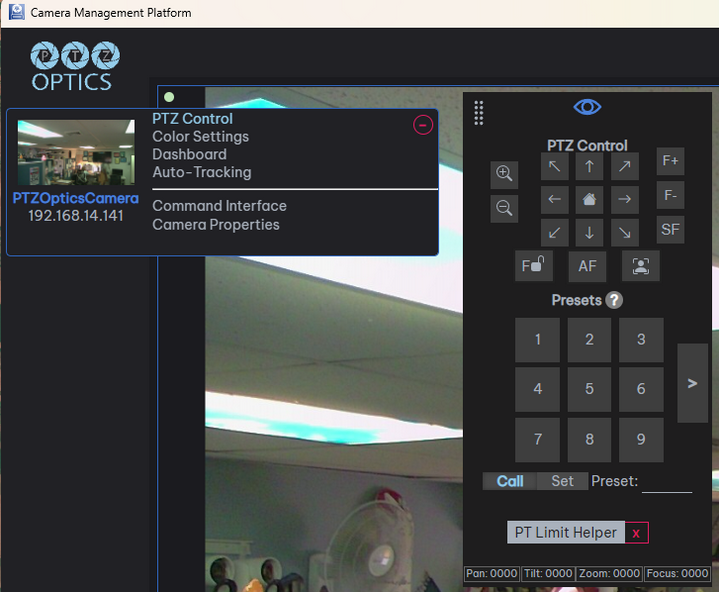
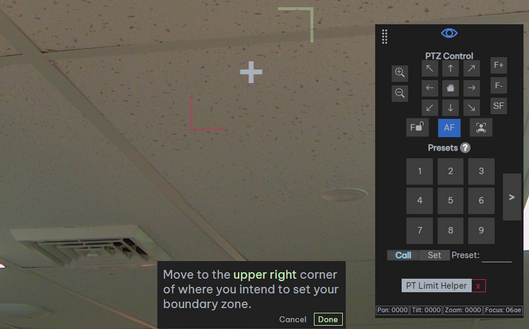
- Click on "PT Limit Helper" and follow the on-screen instructions to set pan-tilt limits.
- Move the camera through the pan/tilt range to confirm where the limits have been set. Click on the red "x" to the right of "PT Limit Helper" to clear the selected camera's pan-tilt limits.