Audio & Video
The Audio/Video section contains all settings related to how the camera outputs, encodes, and streams video and audio. It is organized into three main tabs: AVoIP, Video, and Audio.
Changes to audio/video encoding and streaming settings affect live output immediately or after saving. Modify these settings during scheduled maintenance windows to avoid disrupting active streams.
AVoIP Tab
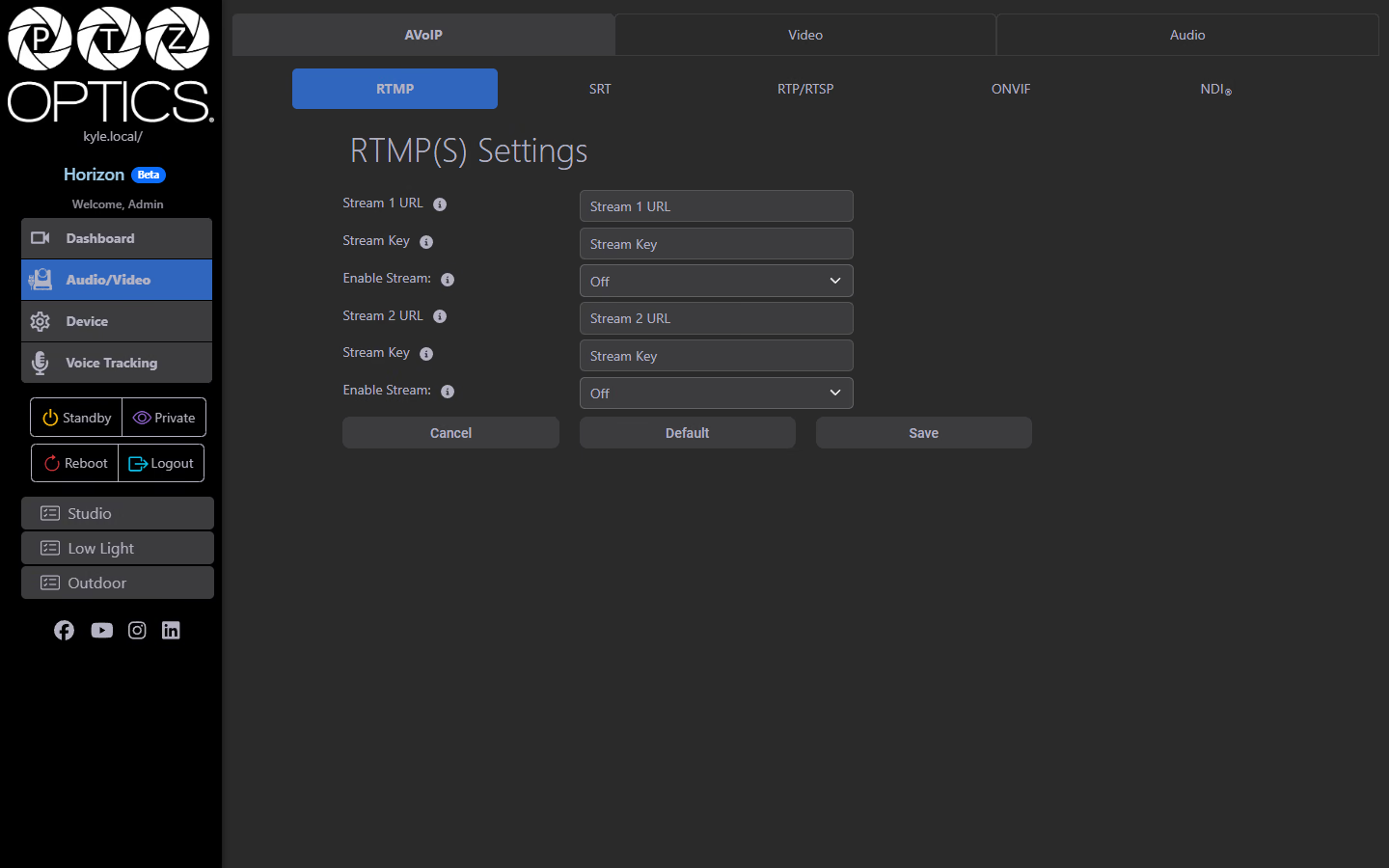
The AVoIP (Audio/Video over IP) tab contains sub-tabs for each supported streaming protocol. Your camera can simultaneously output video via multiple protocols.
RTMP
Real-Time Messaging Protocol — used for streaming to platforms like YouTube Live, Facebook Live, Vimeo, and custom RTMP ingest endpoints.
| Field | Description |
|---|---|
| Stream 1 URL | Defines the RTMP URL from your streaming platform (e.g., rtmp://a.rtmp.youtube.com/live2) |
| Stream 1 Key | Defines the stream key provided by your platform |
| Stream 1 Enable | Toggle to start/stop the Stream 1 RTMP output |
| Stream 2 URL | Defines the secondary RTMP destination |
| Stream 2 Key | Defines the stream key for the secondary destination |
| Stream 2 Enable | Toggle for Stream 2 RTMP output |
RTMP supports simultaneous dual-stream destinations, very useful for simulcasting to two platforms at once (e.g., YouTube and a backup server).
SRT
Standing for Secure Reliable Transport, this is a low-latency, firewall-friendly streaming protocol ideal for contribution over the internet or challenging network conditions.
| Field | Description |
|---|---|
| Enable | Toggle to enable/disable SRT output. |
| Mode | Listener: camera waits for an incoming SRT connection; Caller: camera initiates the SRT connection to a server. |
| Server | IP address or hostname of the SRT destination (used in Caller mode). |
| Port | Default: 4578 |
| Encryption | None / AES-128 / AES-192 / AES-256. |
| Password | Passphrase for encrypted SRT streams. |
| Bandwidth Overhead | Default: 25% extra bandwidth reserved for packet recovery. |
| Latency | Default: 500ms buffer depth; higher values increase resilience at the cost of added delay. |
| Stream ID | Optional identifier string sent with the stream. |
Listener vs. Caller:
- Use Listener when your decoder/receiver will initiate the connection to the camera
- Use Caller when the camera should push the stream to a receiving server
RTP (Multicast) RTSP (Unicast)
| Protocol | Field | Description |
|---|---|---|
| RTSP Unicast | Authentication | Enable/disable authentication for RTSP connections. |
| Port | Default: 554 (standard RTSP port). | |
| RTP Multicast | Enable | Toggle multicast output on/off. |
| IP | Multicast group address (default: 234.1.2.88). | |
| HD Port | High-definition stream multicast port (default: 6688). | |
| SD Port | Standard-definition stream multicast port (default: 6690). |
RTSP Connection String
To pull the RTSP stream from most media players and systems:
rtsp://[camera-ip]:554/stream1
ONVIF
ONVIF (Open Network Video Interface Forum) provides standardized discovery and control for IP cameras. Compatible with video management systems (VMS), NVRs, and most professional AV/IT infrastructure.
| Field | Description |
|---|---|
| Enable | Toggle ONVIF support on/off (currently On by default). |
| Authentication | Enable/disable authentication for ONVIF connections. |
ONVIF must be enabled for the camera to be discoverable by ONVIF-compatible VMS platforms and network video recorders.
NDI®
Network Device Interface (NDI®) by NewTek/Vizrt enables low-latency, high-quality video transport over standard gigabit Ethernet, no additional hardware required.
| Field | Description |
|---|---|
| Local Device Name | The name your camera advertises on the NDI network. |
| Local Device Channel | Channel number (or name) your camera appears as for other NDI devices. |
| Receive Group | NDI receive group for filtering discovery. |
| Discovery Server | Toggle to use an NDI Discovery Server instead of mDNS broadcast. |
| Discovery Server Address | IP address of your NDI Discovery Server. |
| Multicast Server | Toggle NDI multicast mode. |
| Port | NDI port number. |
| Video Template | Sets the NDI encoding quality/format. |
NDI Video Templates
| Template | Description |
|---|---|
| Off | NDI output disabled |
| Ultra | Highest quality, highest bandwidth |
| High | High quality |
| Medium | Balanced quality and bandwidth |
| Low | Lower bandwidth for constrained networks |
| NDI|HX3 264P50 | H.264 compressed NDI HX3 at 50fps |
| NDI|HX3 264P60 | H.264 compressed NDI HX3 at 60fps |
| NDI|HX3 265P50 | H.265 compressed NDI HX3 at 50fps |
| NDI|HX3 265P60 | H.265 compressed NDI HX3 at 60fps |
NDI Full Bandwidth (Ultra/High) requires a dedicated gigabit network segment. NDI HX3 is compressed and works well over standard networks while still maintaining very low latency.
Video Tab
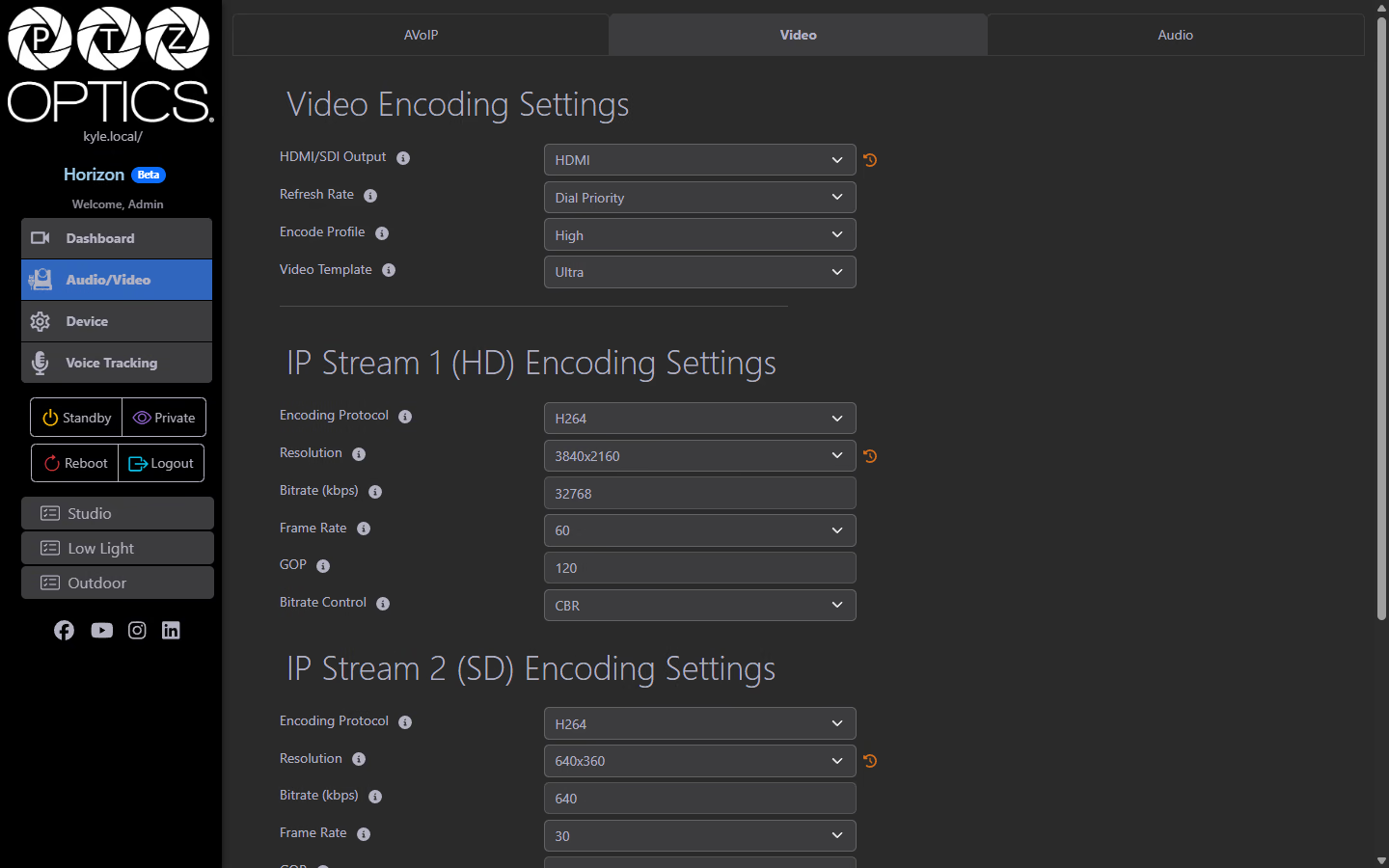
The Video tab controls how the camera encodes and outputs its video signal.
Video Encoding Settings
| Setting | Description |
|---|---|
| HDMI/SDI Output | Selects whether the physical output connector is HDMI or SDI. |
| Refresh Rate | Output refresh rate: 50Hz, 60Hz, or Dial Priority (reads the rear selector switch). |
| Encode Profile | H.264 encoding profile: Main or High. |
| Video Template | Quick preset for resolution, bitrate, and frame rate combinations (Off, Ultra, High, Medium, Low, NDI HX3 variants). |
IP Stream 1 (HD)
The primary high-definition IP stream used for monitoring, recording, and streaming.
| Setting | Options | Description |
|---|---|---|
| Encoding Protocol | H.264 (Widely used. Supported by most platforms & devices)/ H.265 (HEVC. Higher efficiency, requires compatible HEVC video extension) / MJPEG (Requires higher bandwidth, but used where frame by frame analysis is needed). | Video compression codec |
| Resolution | Up to 3840×2160 (4K) | Define the output resolution. |
| Bitrate | Variable | Target bitrate in kbps. |
| Frame Rate | 1–60 fps | Frames per second. |
| GOP | Variable | Group of Pictures interval. Defines how frequently keyframes are transmitted. |
| Bitrate Control | CBR / VBR | Constant Bitrate (Ideal for live streaming) or Variable Bitrate (Ideal for recording). |
IP Stream 2 (SD)
A secondary lower-resolution stream, often used for preview, monitoring on low-bandwidth connections, or recording scratch copies.
| Setting | Options | Description |
|---|---|---|
| Encoding Protocol | H.264 (Widely used. Supported by most platforms & devices)/ H.265 (HEVC. Higher efficiency, requires compatible HEVC video extension) / MJPEG (Requires higher bandwidth, but used where frame by frame analysis is needed). | Video compression codec |
| Resolution | Up to 720×480 | Define the lower resolution output. |
| Bitrate | Variable | Target bitrate in kbps. |
| Frame Rate | 1–60 fps | Frames per second. |
| GOP | Variable | Group of Pictures interval. Defines how frequently keyframes are transmitted. |
| Bitrate Control | CBR / VBR | Constant Bitrate (Ideal for live streaming) or Variable Bitrate (Ideal for recording). |
Stream 1 is the primary high-definition stream, while Stream 2 is typically used for secondary monitoring or backup recording.
USB Video Stream
The USB Video Stream section controls the video output when the camera is connected via USB to a computer (for use as a USB webcam or UVC device).
| Setting | Options | Description |
|---|---|---|
| Encoding Protocol | H.264 / H.265 / MJPEG | Video compression codec for USB output. |
| Resolution | Up to 3840×2160 | Output resolution over USB. |
| Frame Rate | 5–30 fps | Frames per second for USB output. |
Audio Tab
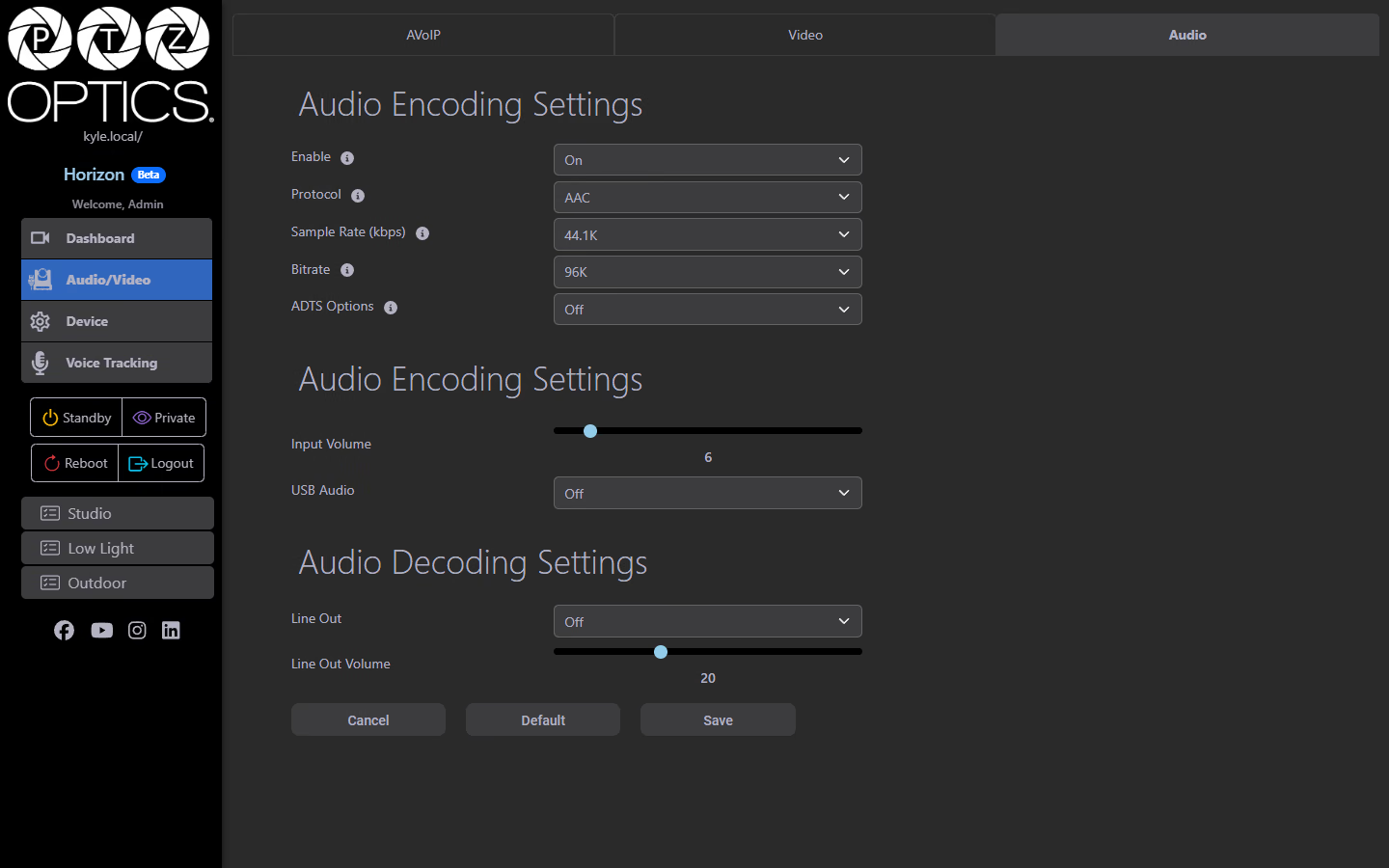
Audio Encoding Settings
| Setting | Options | Description |
|---|---|---|
| Enable | On / Off / Encode from Dante AV-H / Decode from Dante AV-H | Toggle audio encoding on the IP streams, or route audio through a Dante AV-H network audio connection. |
| Protocol | AAC / G711A / G711U | Audio codec. |
| Sample Rate | 48kHz / 44.1kHz | Determines the audio sampling frequency. |
| Bitrate | 96kbps / 128kbps | Defines the encoded audio bitrate for the stream. |
| ADTS Options | Off / On | Audio Data Transport Stream headers. |
Encode from Dante AV-H captures audio from a Dante AV-H network audio source for embedding into the IP stream. Decode from Dante AV-H routes the decoded audio to a Dante AV-H output. These options appear for cameras with Dante AV-H support.
Input Settings
| Setting | Description |
|---|---|
| Input Volume | Slider controlling the level of the microphone/line input going into the stream. |
| USB Audio | Toggle to enable/disable USB audio input (from a connected USB audio device). |
Audio Decoding Settings
| Setting | Description |
|---|---|
| Line Out | Toggle the physical line-level audio output on/off. |
| Line Out Volume | Slider controlling the output level on the line-out connection. |