Buttons
This page documents every control, indicator, and display element on the MiniJoy PTZ Controller.
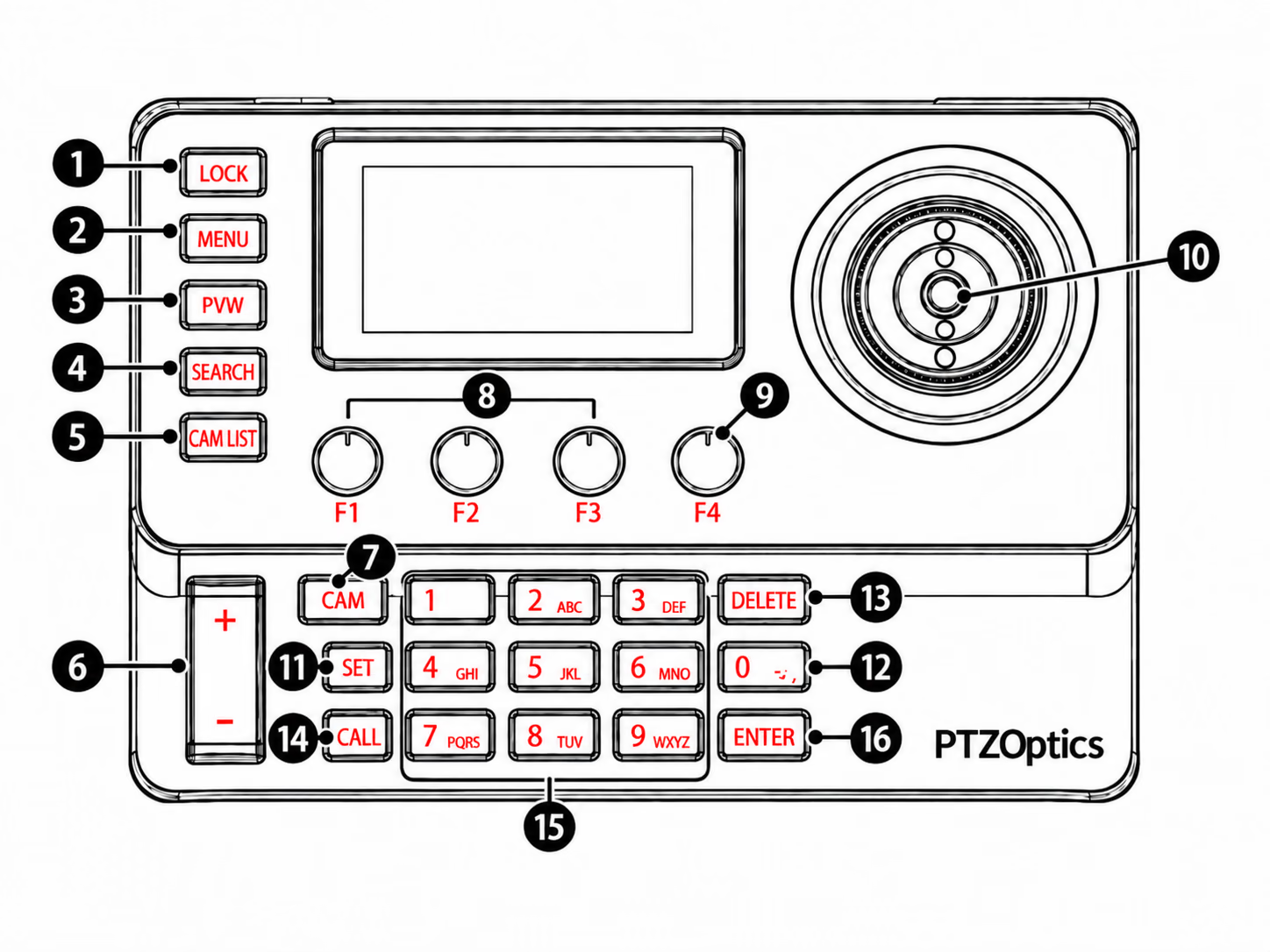
Buttons and Controls
| # | Control | Camera Control / Joystick Operation | Menu Navigation |
|---|---|---|---|
| 1 | LOCK | Press: Lock/unlock the keyboard to prevent accidental operation. | N/A |
| 2 | MENU | Short Press: open keyboard settings menu. | Long Press (3s): open a selected camera's OSD menu. |
| 3 | PVW | Press: Preview the currently controlled device's video stream. | N/A |
| 4 | SEARCH | Press: Search for IP cameras on the local network. | N/A |
| 5 | CAM LIST | Press: Open the camera device list. | N/A |
| 6 | Focus | Press + Symbol to focus in or - Symbol to focus out. | N/A |
| 7 | CAM | Press: Press CAM, enter the camera number, then press ENTER. | N/A |
| 8 | F1-F3 Knobs | Rotate: Adjust assigned parameter. Press: Activate assigned function. | N/A |
| 9 | F4 Knob | Rotate: Change knob pages. Press: Activate the assigned function. | Rotate: Navigate menu options. Press: Select. |
| 10 | PTZ Joystick | Move: Pan, tilt, and Twist to zoom the selected camera in or out. Press the top button to return a selected camera to its home position. | Move: Navigate through the OSD menu. Press: Select. |
| 11 | SET | Press: Store a preset position for the selected camera. Long Press: Default duration (3s) secondary function assigned in settings. | N/A |
| 12 | 0 key (* / -) | Press: Enter the digit 0 or use the symbols for text entry. | N/A |
| 13 | DELETE | Press: Delete the last digit entered on the numeric keypad. | Press: Delete the last digit entered in the menu. |
| 14 | CALL | Press: Recall a preset position for the selected camera. Long Press: Default duration (3s) secondary function assigned in settings. | N/A |
| 15 | Number Keys | Press: Enter camera numbers, preset numbers, and other numeric values. | Multi-tap: Enter text using the numeric keypad. |
| 16 | ENTER | Press: Confirm a camera, preset, or menu selection. | Press: Confirm a menu selection. |
PTZ Joystick
The joystick provides 4-axis control. It can be used to navigate the MiniJoy's On-Screen Display (OSD) menu as well as control the pan, tilt, and zoom functions of the selected camera.
| Axis | Movement | Function |
|---|---|---|
| Horizontal | Left / Right | Pan (horizontal movement) |
| Vertical | Up / Down | Tilt (vertical movement) |
| Rotation | Twist clockwise | Zoom telephoto (ZOOM TELE) |
| Press Top Button | Press the top button | Return the selected camera to its home position |
| Rotation | Twist counter-clockwise | Zoom wide-angle (ZOOM WIDE) |
Horizontal, vertical, and zoom movements can be performed simultaneously.
Knobs F1-F4
The 4 knobs (F1, F2, F3, F4) are customizable. Their current function is displayed at the bottom of the LCD screen.
Knobs 1-3 can send three distinct commands: rotate clockwise, rotate counter-clockwise, and press.
During normal camera operation, Knob 4 activates its assignment only when pressed; rotating it cycles through knob pages. While the MiniJoy OSD is open, rotate Knob 4 to navigate and press it to select a menu item.
Knob Interaction
| Interaction | Function |
|---|---|
| Rotation | Adjust parameters (e.g., Iris, Shutter, Gain, Zoom, Focus) |
| Push (button) | Toggle modes or select options |
During normal camera operation, rotating F4 changes knob pages and pressing it activates the assigned function. While the MiniJoy OSD is open, rotating F4 navigates menu options and pressing it selects the highlighted item.
Knob Pages
The knob area supports 6 custom pages, each with 4 assignable functions. Use the F4 knob to switch between pages.
Available Knob Functions
Knobs 1-3 provide the complete assignment list. Knob 4 provides a smaller toggle-style list because rotating Knob 4 changes knob pages. See the Knob Functions Reference for the current lists.
Screen Display
The 3" LCD screen displays the following elements:
| Area | Description |
|---|---|
| Network Connection Indicator | Shows if the controller is connected to the network |
| Preview Video Indicator | Indicates the current device has an active preview stream |
| Device Info | Device name, control protocol, and IP address (or device ID and baud rate for serial connections) |
| Operation Record Area | Displays recent actions (for example, "Save Preset 1" or "Recall Preset 1") |
| Custom Function Display Area | Shows the current F1-F4 knob functions and supports page switching |
| Camera Mode Display Area | Shows the current camera's mode information, such as exposure mode |
Button Backlight
The silicone buttons feature two-color white-and-red backlighting. Backlight settings are configurable in the Display settings menu.