Device Info
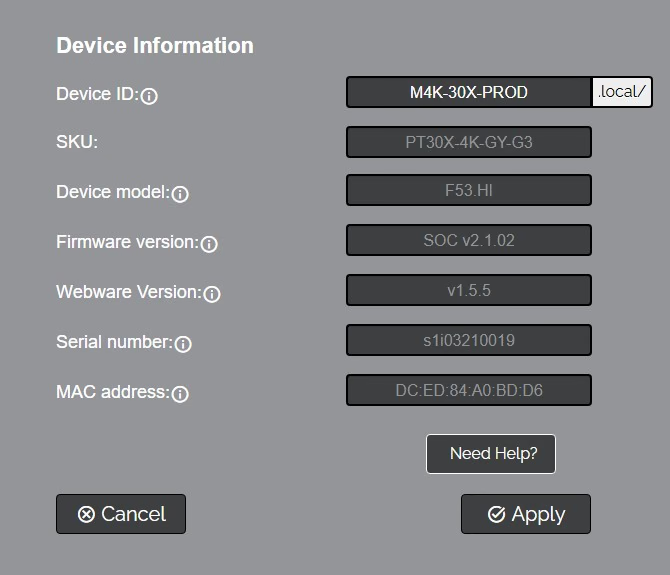
The Device Info tab accesses the Device Information Section.
Device Information
- Device ID: Define the camera’s Device ID to clearly designate which camera you are interacting with. The Device ID is displayed at the top left of the Navigation Panel and anything that queries the camera’s name. You can also reach the camera's web interface by entering the Device ID followed by ".local".
- SKU: The SKU is a field that PTZOptics uses to designate the camera. (Move 4K & Link 4K only)
- Device Model: The Device Model is a field that PTZOptics uses to designate the camera.
- Firmware Version: The Firmware Version displays the firmware file currently running on the camera.
- Webware Version: The Webware Version is the version of the web interface.
- Serial Number: The camera’s serial number.
- MAC Address: The MAC Address is a unique address the Ethernet port utilizes to communicate with the network. You cannot change this address.
- Need Help? This will take you to the PTZOptics Knowledge base.
The Device Info page displays identifying information about the SimplTrack3 hardware and software.
| Field | Description |
|---|---|
| Device ID | The camera's hostname on the local network is used for identification in Device Manager and mDNS discovery. The .local/ suffix is appended automatically (e.g., ST3-123 resolves as ST3-123.local/). |
| Model | Hardware model identifier (read-only), displays SimplTrack3. |
| Firmware Version | Current camera firmware version (read-only). |
| Device Mac Address | Hardware MAC address (read-only). |
| Need Help? | Click Submit a Ticket to open the PTZOptics support portal and submit a support request. |
Click Apply after changing the Device ID. Click Refresh to reload the current values.
tip
The Device ID is what appears in the browser tab, in mDNS discovery, and in Device Manager. Give each camera a meaningful, unique name (e.g., main-stage-tracker, lecture-hall-st3) to make managing multiple cameras easier.