Streaming Settings
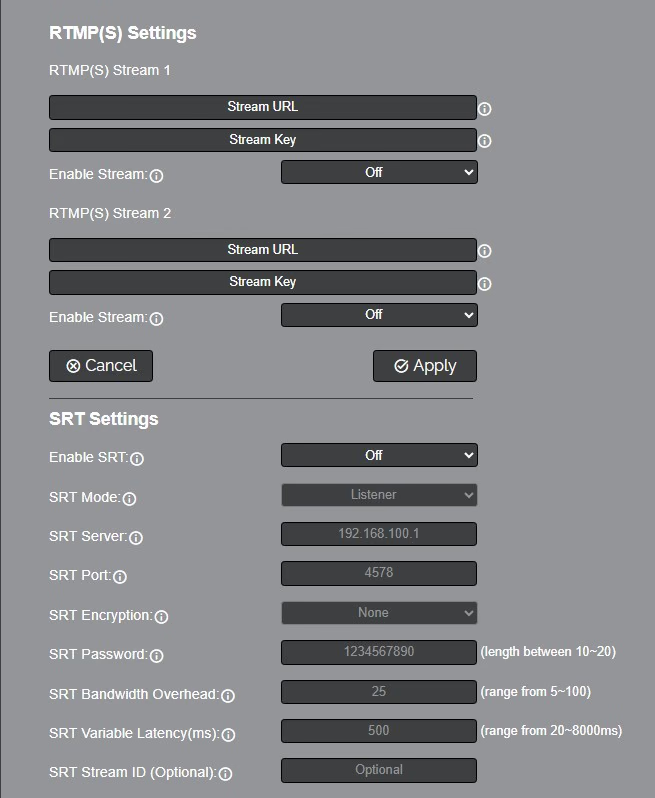
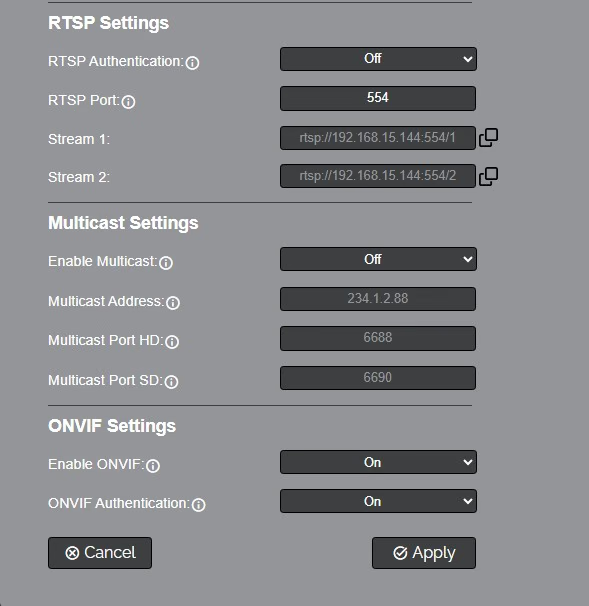
The Streaming Settings page accesses the RTMP(S) Settings, SRT Settings, RTSP Settings Multicast Settings & ONVIF Settings sections.
RTMP(S) Stream 1 & 2 Settings
- RTMP(S) Stream URL: Define the RTMP Address of the CDN you wish to stream to.
- RTMP(S) Stream Key: Define the stream key of the CDN you wish to stream to.
- Enable Stream: Toggle the RTMP stream on or off.
SRT Settings
- Enable SRT: Toggle the SRT stream on or off.
- SRT Mode: Define whether the SRT stream is pulled (Listener) from the camera, or whether the stream must be pushed (Caller) to a server.
- SRT Server: Define the Server IP address. This is only used in Caller mode.
- SRT Port: The SRT Port is how you reach the SRT video feed of your camera.
- SRT Encryption: None, AES-128, AES-192, AES-256
- SRT Password: Define the SRT password when utilizing SRT Encryption
- SRT Bandwidth Overhead: SRT Bandwidth is a percentage that you assign that helps determine the total bandwidth that the SRT stream will use up. This percentage should not exceed 50%, and is set to 25% by default. Range 5 ~100.
- SRT Variable Latency(ms): Define the maximum buffer size for maintaining SRT packets from the camera to the destination. Range 20 ~ 8000ms
- SRT Stream ID (Optional): Define a unique name for the SRT stream.
RTSP Settings
- RTSP Authentication: Toggle RTSP Authorization on or off.
- RTSP Port: The RTSP Port is how you reach the RTSP video feed(s) of your camera.
- RTSP Stream 1: Copiable URL link to access the RTSP HD stream.
- RTSP Stream 2: Copiable URL link to access the RTSP SD stream.
Multicast Settings
- Multicast Mode: Toggle Multicast on or off.
Only use this setting with a network configured for Multicast.
- Multicast Address: Define the Multicast Address. Recommended format: 234.1.2.[camera IP address last octet]
- Multicast Port HD: The Multicast Port HD is how you reach the HD stream through RTP Multicast.
- Multicast Port SD: The Multicast Port SD is how you reach the SD stream through RTP Multicast.
ONVIF Settings
- Enable ONVIF: Toggle ONVIF control on or off.
- ONVIF Authentication: Toggle ONVIF Authentication on or off.
The Streaming Settings page configures how the SimplTrack3 pushes video to external streaming platforms and how clients can pull streams via RTMP and RTSP.
RTMP(S) Settings
Real-Time Messaging Protocol (RTMP) is used for streaming to platforms like YouTube Live, Facebook Live, Vimeo, and custom RTMP ingest endpoints. The SimplTrack3 supports two simultaneous RTMP destinations, one for the PTZ stream and one for the Reference stream.
PTZ Stream (RTMP Stream 1)
| Field | Description |
|---|---|
| Stream URL | The RTMP(S) ingest URL provided by your streaming platform (e.g., rtmp://a.rtmp.youtube.com/live2). |
| Stream Key | The stream key provided by your platform. |
| RTMP(S) Stream 1 | Off / On; Enables or disables RTMP output for the PTZ stream. |
Reference Stream (RTMP Stream 2)
| Field | Description |
|---|---|
| Stream URL | The RTMP(S) ingest URL for the second stream destination. |
| Stream Key | The stream key for the second destination. |
| RTMP(S) Stream 2 | Off / On — Enables or disables RTMP output for the Reference stream. |
Click Apply to save changes. Click Refresh to reload the current values from the camera.
RTSP Settings
RTSP (Real-Time Streaming Protocol) allows other devices and software to pull a live stream directly from the camera.
| Setting | Options | Description |
|---|---|---|
| RTSP Authentication | Off / On | When enabled, clients must provide credentials to access the RTSP stream. |
| RTSP Port | Numeric (default: 554) | The port used for RTSP connections. |
Click Apply to save changes. Click Refresh to reload the current values.
To pull the RTSP stream from most media players and systems:
rtsp://[camera-ip]:554/1