Network Settings
Network Settings
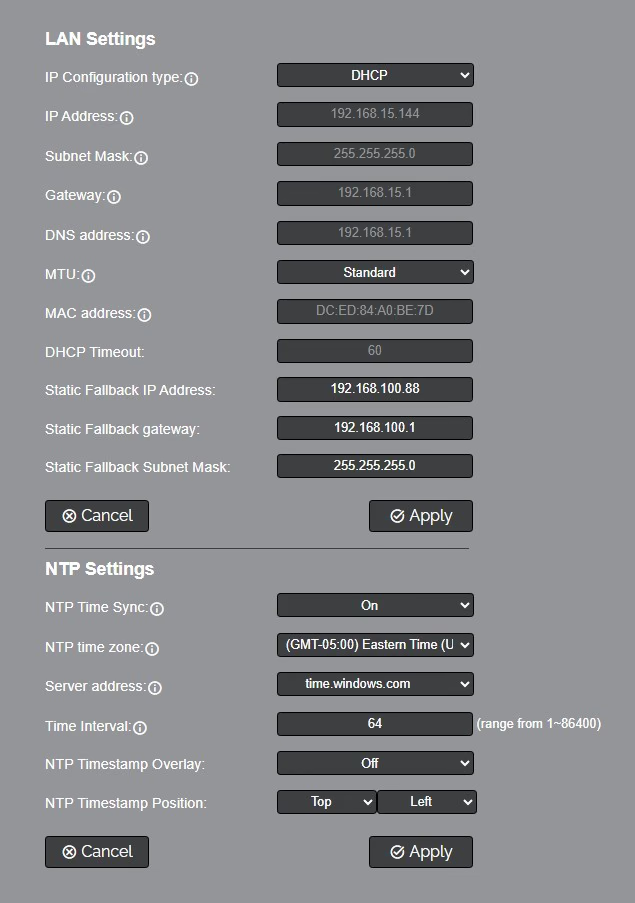
The Network Settings page accesses the LAN Settings & NTP Settings sections.
LAN Settings
- IP Configuration Type: Select whether the camera automatically configured the network settings (DHCP) or whether you manually configure the network settings (Static).
- IP Address: The IP address is a unique address the network uses to connect and configure the camera.
- Subnet Mask: The Subnet Mask is a set of numbers that defines how large your network is.
- Gateway: The Gateway is the address associated with your router to connect to the internet.
- DNS Address: The DNS address is a unique IP address the camera will query when trying to reach a specific website.
- MTU: The Maximum Transmission Unit (MTU) defines the largest packet size that can be sent over your network. Options include:
- Standard (1500 bytes)
- Jumbo Frames (9000 bytes)
- Custom (User Defined)S
- MAC Address: The MAC Address is a unique address the Ethernet port utilizes to communicate with the network. You cannot change this address.
- DHCP Timeout: controls how long the camera waits to obtain an IP address after being powered on. This setting can not be changed.
- Static Fallback IP Address: Define a static IP address that the camera will revert to if it cannot obtain an IP address from the DHCP server.
- Static Fallback Gateway: Define a static Gateway address that the camera will revert to if it cannot obtain a Gateway address from the DHCP server.
- Static Fallback Subnet Mask: Define a static Subnet Mask that the camera will revert to if it cannot obtain a Subnet Mask from the DHCP server.
NTP Settings
- NTP Time Sync: Toggle Network Time Protocol (NTP) on or off.
- NTP Time Zone: Select your time zone.
- Server Address: Define the NTP Server Address you wish to utilize.
- Time Interval: Define how frequently NTP queries the server (in seconds).
- NTP Timestamp Overlay (ms): Define the delay (in milliseconds) that is added to the NTP timestamp to account for network latency.
- NTP Timestamp Position: Define where the NTP timestamp appears on the video overlay. Options include: Off, Top Left, Top Center, Top Right, Bottom Left, Bottom Center, Bottom Right.
The Network Settings page controls how the SimplTrack3 connects to your local network and synchronizes its internal clock.
LAN Settings
Controls the camera's IP configuration on the local network.
| Setting | Description |
|---|---|
| IP Configuration Type | DHCP: Camera receives an IP address automatically from your router/DHCP server; Static IP: Camera uses a manually assigned static IP address. |
| IP Address | The camera's current IP address (read-only in DHCP mode). |
| Subnet Mask | Network subnet mask (read-only in DHCP mode). |
| Gateway | Router/gateway IP address (read-only in DHCP mode). |
| DNS Address | DNS server address (read-only in DHCP mode). |
| MAC Address | Hardware MAC address (read-only). |
| DHCP Timeout | How long (in seconds) the camera waits for a DHCP address before falling back to the static fallback address (read-only). |
| Static Fallback Address | IP address used if DHCP times out. |
| Static Fallback Mask | Subnet mask for the fallback address. |
| Static Fallback Gateway | Gateway used with the fallback address. |
Click Apply to save changes. Click Refresh to reload the current values.
Static vs. DHCP
For permanent installations (conference rooms, studios, houses of worship), a DHCP reservation is recommended. This assigns a consistent IP address to the camera based on its MAC address, ensuring reliable access without manual network configuration.
NTP Settings
Network Time Protocol keeps the camera's internal clock synchronized with an external time server.
| Setting | Options | Description |
|---|---|---|
| NTP Time Sync | Off / On | Enables or disables NTP clock synchronization. |
| NTP Time Zone | UTC offset (-12:00 to +14:00) | Select your local time zone. |
| Server Address | time.windows.com, time.apple.com, Custom NTP | The NTP server to synchronize with. Select Custom NTP to enter a custom server address. |
| Time Interval | Numeric (seconds) | How frequently the camera syncs its clock with the NTP server (default: 64 seconds). |
Click Apply to save NTP settings.